
The Headless Trap
Your engineering team sold you a dream: lightning fast page loads, omni-channel distribution, features launched in days instead of months. The future of your brand, wrapped in something called “Headless Architecture.” You signed off on the migration.
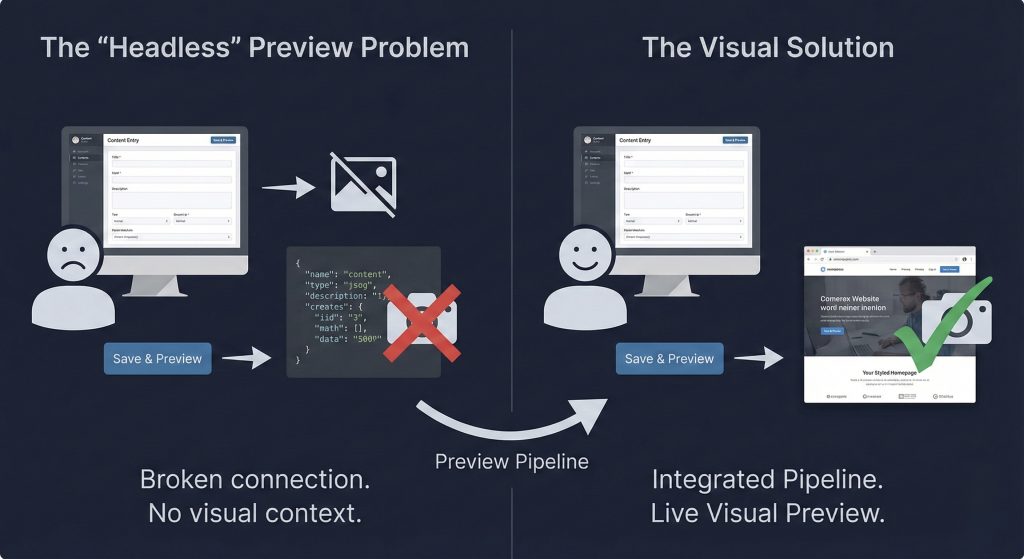
Then came launch day. You logged into the new CMS, updated your hero banner, and reached for the “Preview” button. It wasn’t there. Or it loaded a blank page. Or worse, a raw JSON file that looked like code, not your website. Suddenly, your marketing team is flying blind. Changing a comma requires asking a developer to “push to staging.” The promised agility? Replaced by anxiety and bottlenecks.
Welcome to the “Preview Problem” the most common friction point in enterprise headless migrations. But here’s the good news; headless architecture doesn’t mean visual-less editing. You can have both speed and control. Let’s fix this.
Why Your Preview Button Died
Understanding the problem is half the solution.
In traditional monolithic CMS platforms like WordPress or standard Shopify, the CMS is the website. Your database and theme are fused together. Hit “Preview,” and the system instantly renders your page because it owns everything—data and design.
Headless architecture severs that connection by design.
Now your CMS is just a data vault—storing text, images, and URLs with zero knowledge of what your site looks like. It doesn’t know your fonts, colors, or layouts. Meanwhile, your frontend (the “head”) lives as a separate application, often on a different server entirely.
The disconnect: When you type into a headless CMS, you’re feeding data into a vault. Your frontend doesn’t see this data until you hit “Publish” and trigger a build. This creates a feedback gap marketers shouting into the void, hoping the frontend hears them correctly. This isn’t a bug; it’s architecture. Decoupling brings speed and security. But to restore visual editing, you need to build a bridge—a “Preview Pipeline” that temporarily reconnects your data and design for internal teams.
Three Solutions to Restore Live Previews
Regaining visual control doesn’t mean abandoning headless. It means implementing the right preview protocol. Here are your three options.
1. On-Demand Draft Mode (Next.js & React)
This is the industry standard for enterprise builds using frameworks like Next.js. Most headless sites use Static Site Generation (SSG) pages are built once and cached for instant loading. The problem? When you change a title, the server doesn’t know to rebuild that specific page just for you.
The solution: Draft Mode
When a marketer clicks “Preview,” the CMS sends a secret bypass token to your frontend. The frontend recognizes this token and skips the cached version, fetching fresh, unpublished data directly from the CMS API instead.
Result: Marketers see new content instantly, rendered exactly as it will appear live, while the public still sees the cached version.
Pros: 100% accurate—it uses your real production code.
Cons: Requires developer setup for secure token handling.
2. Split-Screen Iframe (The Side-by-Side Experience)
Tired of toggling between tabs? This solution embeds your site directly into the CMS. Platforms like Sanity and Contentful offer split-pane views:
- Left side: Input fields (title, body, images)
- Right side: An iframe displaying your draft-mode website
Advanced setups add real time listeners. Type in the left pane, and the right pane updates instantly, keystroke by keystroke, without saving. It’s the Google Docs experience for web content.
Pros: Exceptional UX; keeps marketers focused in one tab.
Cons: The embedded site can feel cramped on smaller laptop screens.
3. Visual Headless CMS (The Hybrid Approach)
Some teams find form-based data entry too abstract. They need a true page builder experience. Enter visual headless platforms like Storyblok, Builder.io, or Stackbit. These tools add a visual layer on top of your code. Instead of filling out a “Hero Banner” form, you click directly on the banner and edit text inline. Under the hood, it still generates clean JSON for developers. It’s headless in architecture but monolithic in experience.
Pros: Minimal learning curve; eliminates the “imagination gap.”
Cons: Can limit developers if visual blocks aren’t defined with enough structure.
Redefining Your Marketing Workflow
Solving the preview problem isn’t just about software, it requires a mindset shift. From Painters to Architects. In the old monolithic world (WordPress, Elementor, Wix), marketers were painters, dragging text boxes anywhere, resizing images by eye, changing fonts on a whim. In the headless world, marketers must become architects.
The old way: “I want to move this headline 10 pixels left and make it red.”
The new way: “I’ll populate the Hero Component fields. The frontend automatically handles spacing, color, and alignment across mobile, tablet, and desktop.” This feels restrictive at first. But it’s actually a feature.
Why? Design system integrity. It prevents junior marketers from accidentally breaking mobile layouts or using off-brand fonts. It guarantees your brand looks identical on a 27-inch monitor and an Apple Watch.
The New QA Workflow
With Draft Mode solutions, your workflow evolves from Edit → Save → Hope to Edit → Preview → Validate. Because your frontend is decoupled, preview your content across contexts before publishing:
- Multi-device check: See how your Hero Component reflows on mobile versus desktop
- Omnichannel check: If you’re pushing content to mobile apps or digital kiosks, validate that text isn’t too long for smaller screens
This validation step catches issues before they go live, preventing embarrassing rollbacks and emergency fixes.
The Bottom Line: Agility Without Blindfolds
The transition to headless and composable commerce is often sold on technical merits: speed, security, scalability. For marketing teams, it can feel like a step backward. It doesn’t have to be.
Implement a robust preview pipeline, whether through On-Demand Draft Modes, Split-Screen Iframes, or Visual CMS platforms and you get the best of both worlds. The blistering speed of a React-based frontend and the visual confidence of traditional page builders.
Don’t let the preview problem derail your modernization. Address it early, resource it properly, and your marketing team will become the biggest champions of your new architecture. The headless trap isn’t permanent. With the right bridge between data and design, you can deliver the agility you were promised—no blindfold required.
You may also like